
What Is a DVR and How Does It Actually Work?
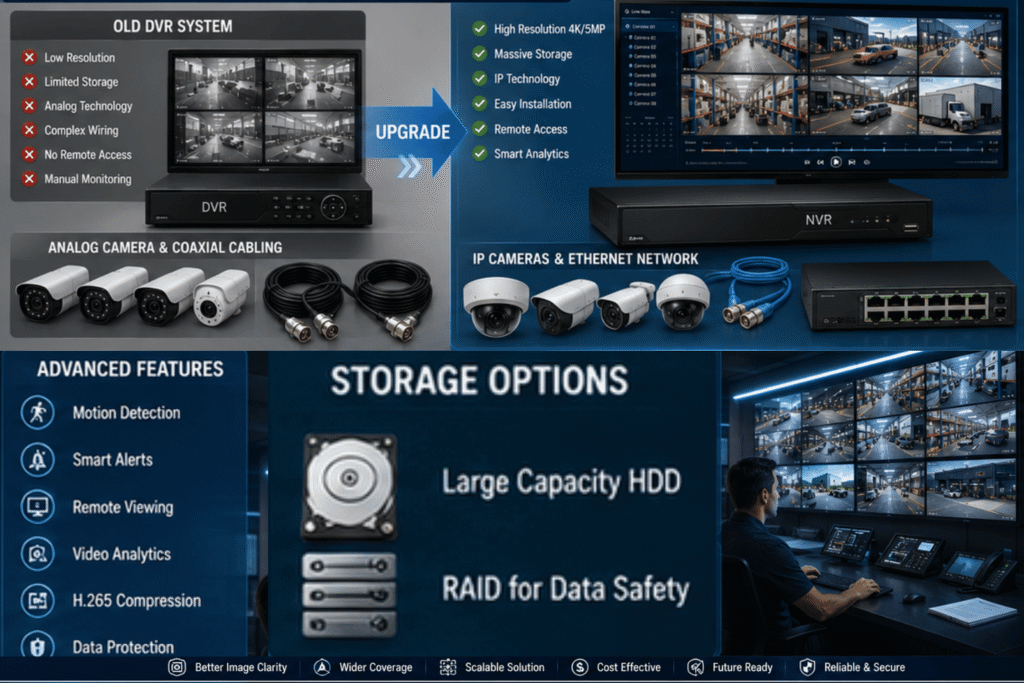
Compression happens where you’d least expect it — inside the recorder, not the camera. A DVR pulls raw analog signals from cameras through thick coaxial cables, then handles all encoding and signal conversion internally. That centralized bottleneck shapes every limitation the system carries.
Every footage archiving decision — retention period, overwrite policy — traces back to HDD capacity. Once full, operators physically swap drives. For legacy systems in retail or small warehouses, this manual cycle repeats until the hardware itself reaches the end of its lifespan around 5–10 years.
The NVR Architecture That Changed Everything
What surprised me most about NVR deployments is how the distributed processing model collapses installation complexity. IP cameras encode footage independently using onboard processors, sending pre-encoded streams over a single Ethernet cable carrying both data and PoE power simultaneously.
Resolution ceilings shift dramatically here. Where coaxial cables cap out near 2K and show signal degradation beyond 300 feet, Ethernet transmits 4K, 5K, 8K footage over longer runs without quality loss. The gap isn’t incremental — it’s generational.
Cloud Storage: The Off-Site Variable Nobody Planned For
Most installations treat cloud storage as a backup layer. That framing undersells it. Off-site footage on remote servers survives physical tampering, hardware theft, and on-site destruction. For multi-location businesses, it also eliminates the need for separate IT oversight at every site.
The honest trade-off is bandwidth dependency and recurring subscription fees. High-bitrate streams require stable internet, and latency can affect live-view responsiveness. But SaaS-based cloud eliminates HDD failures, firmware patching, and storage upgrade headaches entirely.
Why Total Cost of Ownership Rewrites the Budget Decision
DVR wins the upfront cost argument, easily. But run the TCO calculation across 5 years — accounting for HDD replacement, maintenance, missed analytics capabilities, and eventual infrastructure overhaul — and the picture changes considerably in NVR’s favor.
Cloud’s monthly fee structure scares operators used to one-time hardware purchases. In practice, it replaces hardware maintenance, cybersecurity patching, and disaster recovery planning with a single managed SLA. For businesses without dedicated IT staff, that trade converts operational uncertainty into a predictable line item.
Choosing the Right Storage: Quick Decision Matrix
| Decision Factor | Best Choice |
| Existing coaxial wiring, basic monitoring only | DVR |
| New build, high resolution, AI features needed | NVR |
| Off-site backup, multi-location access, no local IT | Cloud |
| Best of both worlds — local speed + off-site safety | NVR + Cloud Hybrid |
The Scalability Gap Nobody Talks About
Expanding a DVR setup means physical hardware replacement, and NVR means adding drives or network storage, and Expanding cloud storage means adjusting a subscription tier. These aren’t equivalent actions — they represent fundamentally different operational models with cascading effects on staff time, budget cycles, and deployment speed.
Facilities with compliance requirements for extended data retention — healthcare, cannabis, financial services — consistently find cloud the only practical answer. Unlimited capacity, encrypted transmission, and audit-ready access logs align naturally with regulatory expectations.
AI Analytics: The Feature That Separates NVR from DVR
This is where the technology gap becomes irreversible. Facial recognition, license plate recognition, and behavioral analysis require the kind of high-resolution, network-transmitted footage that only IP cameras and NVR architecture can deliver. DVR hardware physically cannot process these features regardless of firmware updates.
From my own installation experience: clients who chose DVR for cost reasons in 2019 are now facing full hardware overhaul costs to access AI-powered features their competitors already use. The upgrade path on DVR terminates where NVR begins. That gap widens every year as smart surveillance capabilities advance.
FREQUENTLY ASKED QUESTIONS
| Q: Can a DVR work with IP cameras?
A: No. Standard DVRs process only analog signals — they cannot interpret pre-encoded digital data that IP cameras transmit over network protocols. Only hybrid recorders designed for dual-input can bridge this gap, and even then with limited resolution and no AI feature access. |
| Q: Which lasts longer — a DVR or an NVR?
A: Both typically last 5–10 years. NVRs often age more gracefully because IP camera technology continues to evolve within compatible standards. DVR longevity is increasingly constrained by declining analog component availability and shrinking manufacturer support timelines. |
| Q: Is cloud storage more secure than DVR/NVR?
A: Depends on the threat. Cloud storage uses encryption and off-site redundancy to neutralize physical tampering and on-site data breach risks. However, it introduces internet-facing exposure through VPN vulnerabilities and credential management. Neither approach is inherently superior without deliberate security planning. |
| Q: Can DVR/NVR be combined with cloud storage?
A: Yes — the hybrid model is increasingly common. Local NVR handles fast access and live view, while cloud backup covers disaster recovery and long-term data retention. This combination delivers both operational speed and off-site redundancy without fully committing to either model. |