
How to Upgrade an Old CCTV System
Most people don’t realize how badly an old surveillance system setup is failing them until something goes wrong. A blurry frame, a grainy timestamp, a pixelated face that could belong to anyone — these aren’t minor inconveniences. They’re the fingerprints of a security system that stopped doing its actual job years ago. Working with outdated technology isn’t just frustrating; it’s a liability most property owners carry without knowing.
Here’s what experience in the field makes clear: the conversation about upgrading your CCTV almost never starts the right way. Most people wait until there’s an incident — vandalism, a break-in, a vehicle that nobody could identify — before they act. The smarter play is treating your surveillance system the way engineers treat infrastructure: audit regularly, replace proactively, and never let age decide your security posture.
Diagnose Before You Decide
The first thing any competent upgrade process demands is an honest evaluation of what you currently have. Don’t skip this step in the rush to buy new equipment. Identify whether your cameras are analog or IP-based, check your current resolution output, and verify whether your storage method — be it a DVR or fragmented local backup — is still functional. Ask whether you can monitor a live feed from a mobile device without workarounds.
Worn coaxial cables, faulty power supply connections, and dead BNC terminations reveal themselves as video loss, rolling lines, ghosting, or off-color distortion on your monitor. These aren’t camera problems — they’re infrastructure warnings. A damaged cable running to an old DVR can even corrupt a perfectly new recorder you plug in. Fix the root cause, not just the symptom.
While you’re at it, inspect the cable type across your system. Thin premade cable — the kind bundled in big-box store kits — simply cannot carry 4K or even reliable 1080P signals. RG59 siamese wire with solid copper core is the gold standard for analog runs and can push HD footage reliably across 600 ft of distance. Cat5e or Cat6 Ethernet is the backbone of any serious IP camera deployment.
The Analog-to-IP Camera Shift
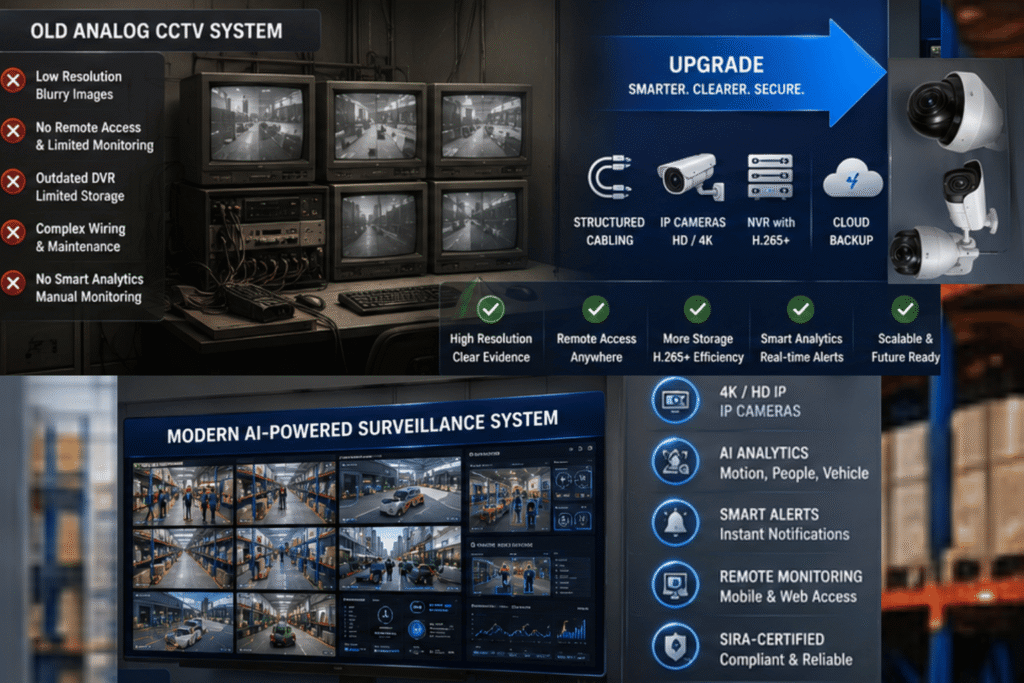
Switching from analog to IP cameras is the single highest-impact decision in any CCTV upgrade. IP cameras communicate over a network, deliver Full HD to 4K resolution, support remote access through smartphone apps or a web browser, and plug directly into a framework that accommodates AI analytics, motion detection, and smart alerts without additional hardware.
If your existing coaxial cabling is in good structural condition, you’re not forced into a full rewire. HD-over-Coax formats — specifically HD-TVI and HD-CVI — allow you to run high-definition signals over the same coax infrastructure you already have, preserving your capital while dramatically improving image quality. Ethernet baluns extend that flexibility even further for hybrid environments.
The camera selection itself deserves careful thought. Resolution isn’t a one-size-fits-all decision. A 1080P camera covering an interior hallway at 20 feet is entirely appropriate. A 4K unit trained on a parking lot entrance at 70 feet is a completely different requirement. Mix and match based on field of view needs, not brand loyalty. A 90-degree angle of view can cover both sides of a room simultaneously; a PTZ (Pan-Tilt-Zoom) camera replaces three fixed units in high-traffic zones. Infrared night vision handles low-light interiors; color night vision technology is now mature enough for exterior perimeter use in 24/7 surveillance scenarios.
Recorder and Storage Architecture
The DVR-to-NVR transition is non-negotiable for anyone running IP cameras. A Network Video Recorder doesn’t just store footage — it structures it. H.265 video compression reduces file sizes by nearly half compared to older codecs without sacrificing clarity, which means your same storage capacity now holds twice the footage. Modern NVRs ship with remote viewing built in, smart analytics integration-ready, and cloud storage compatibility for off-site backup.
Cloud storage as a secondary layer isn’t a luxury in high-risk environments; it’s a data integrity measure. On-site recorders can be stolen, damaged, or fail during power outages — a UPS (Uninterruptible Power Supply) and surge protector in your rack buys time, but off-site backup is what guarantees footage retrieval when it matters most.
Smart Features That Actually Work
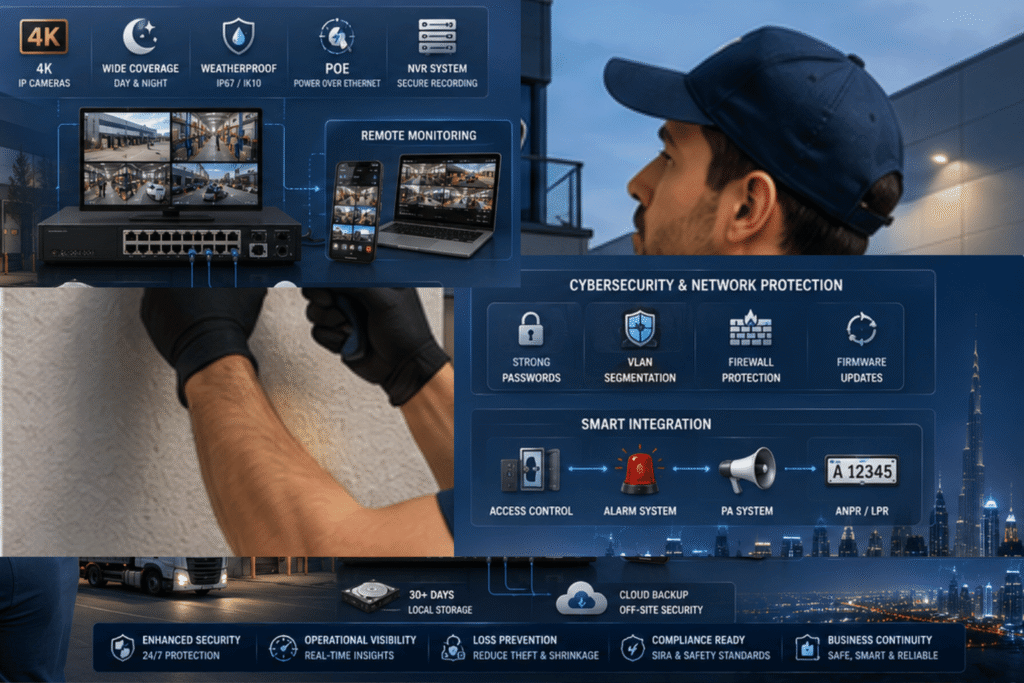
Modern CCTV isn’t passive recording — it’s an active intelligent surveillance layer. AI motion detection now reliably distinguishes between a person, a vehicle, and an animal — meaning the false-alarm rate that plagued older motion sensors drops dramatically. Line crossing and intrusion alerts define virtual perimeters across camera feeds and trigger mobile notifications the instant something crosses them.
Facial recognition and license plate recognition (LPR) have shifted from enterprise-only features to mid-range IP camera territory. Crowd detection and loitering detection are now standard on many NVR platforms and carry real operational value for retail environments and commercial facilities.
Critically, integrate your upgraded system with your access control, alarm panels, and smart building infrastructure where possible. An isolated camera network in 2026 is as outdated as the analog system you’re replacing.
Cybersecurity Is Not Optional
An IP camera network connected to the internet is a network attack surface. Change every default password on every device — cameras, NVR, and router — before the system goes live. Run your surveillance equipment on a dedicated VLAN with network segmentation keeping it isolated from your primary business or home network. Keep firmware updated across all devices; most modern cameras push automatic updates when configured correctly. Avoid integrating unknown third-party apps that request camera access.
When to Call a Professional
For small home setups, a skilled DIY installer can handle 4–8 cameras in a weekend. For commercial spaces, multi-floor buildings, or systems requiring deep access control integration, a professional delivers: optimal camera positioning, clean structured cabling, regulatory compliance, and an ongoing maintenance plan that keeps your system audit-ready. The consultation cost is almost always recovered in avoided mistakes.
FAQs
How do I know if my CCTV system needs upgrading? Blurry footage, absent night vision, no remote monitoring, and a DVR that overwrites every 24–48 hours are strong indicators. Systems older than 5 years typically lack current capabilities.
Can I upgrade without replacing all cables? Yes — HD-over-Coax cameras (HD-TVI/HD-CVI) run over existing RG59 coax. Ethernet baluns bridge IP cameras to coaxial runs for mixed environments.
What’s the difference between a DVR and NVR? DVRs process analog signals; NVRs manage IP camera data over a network with better resolution, compression, and smart feature support.
Is switching to IP cameras worth it? Definitively yes — Full HD to 4K output, remote access, AI analytics, and far greater scalability over time justify the cost.
What cybersecurity steps matter most post-upgrade? Change default credentials immediately, enable VLAN segmentation, keep firmware current, and restrict network access for camera devices.
How long does a professional CCTV upgrade take? Small residential systems: one day. Mid-size commercial deployments: two to three days depending on cabling complexity and integration scope.